“Local ads” VS “Local campaigns”: what's the difference?
Google local ads are often confused, but “local ads” and “local campaigns” do not work in the same way, nor with the same objectives. A brief analysis to understand how to choose the most effective format to attract more customers to the store.
.webp)
Geotargeted or “local” ads are extremely powerful types of ads for physical stores. Indeed, they make it possible to communicate with potential customers within a geographical radius around the store. This is with the aim of attracting customers to the store and thus moving from “online” to “offline”. Many platforms offer the creation of local ads like Google, Facebook, Instagram, Waze,...
Regarding the Google geolocalized ads, two terms are often used to describe them: “Local ads” and “Local campaigns”. But a distinction ’has never yet been made between these two terms... Mobilosoft therefore investigated the question: is there a distinction between these terms and if so, what is this distinction?
- What “local ad” ’is what?
- How to create a “local ad” on Google?
- What “local campaign” ’is what?
- How to create a “local campaign” on Google?
- The major differences
1. What is a “local ad”?
A local ad is a correct term to describe a geolocalized ad. It's an ad that will digitally promote your store in a geographic area around it. When a person searches for a service you offer near your store, Google will display your listing Google Business Profile in the top search results. Google calls this type of ad “local search ads”. Ceux-ci sont particulièrement intéressants pour les recherches mobiles!
The local search ads are used for a very specific purpose: bring the client to the point of sale. This strategy is called “Web-to-store” and consists of optimizing the digital visibility of a point of sale to facilitate the transition from a “digital” visit to a “physical” visit.
2. How to create a local ad on Google?
To create a local search ad, you must first create an Google Business Profile listing for your business. This page will be the anchor point in creating your advertisement.
Here are the steps to follow:
- Before you start, you must enable location extensions for your Google Ads account. To do this, log in to your Google Ads account and link your page Google Business Profile à your Google Ads account. For more ’information à this subject, see the ’Google article. Make sure to vérify the information on your GMB listing before créating your adé.
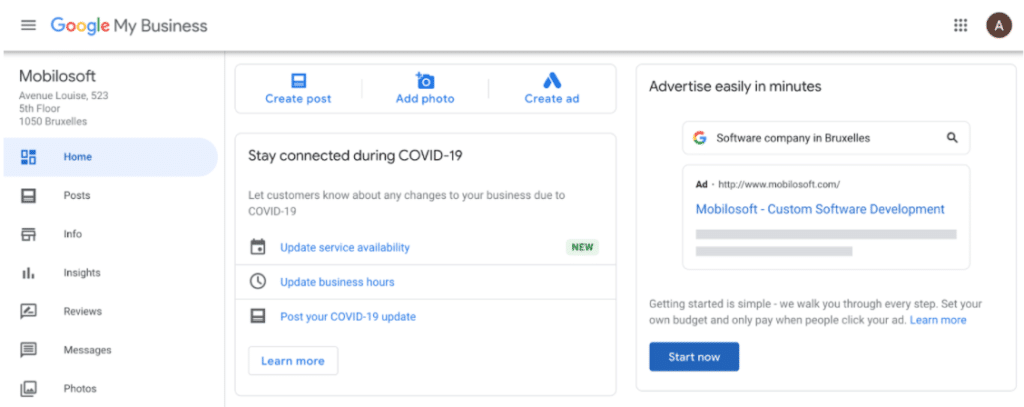
- Next, go to your Google Business Profile account. Click “Start Now” at the bottom right to build your ad.
3. Select the goal of your campaign. Depending on your choice, Google will optimize the times when your ad appears.

4. Select what people will discover when they click on your ad. Two choices: either on your website or on the Google Business Profile listing of your business (with Google Maps, photos, descriptions,...)

5. Find out how Google will display you. If this suits you, click on “Next”.

6. It's then time to give content for your advertisement. To do this, give 3 titles (maximum 30 characters) and 2 descriptions (maximum 90 characters). Add a CTA or “Call to action”, your phone number and address.

7. Then select keywords that best describe your establishment. Think about which words a person might use when they search for a service or a brand like yours. Don't forget to select the language for your advertisement! Check this Google article to learn more!
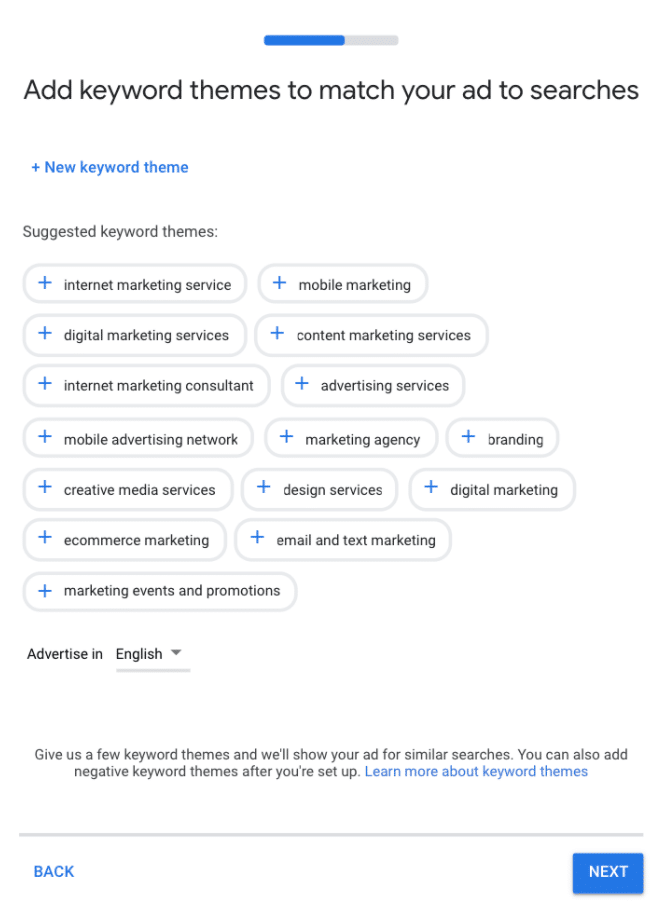
8. The next step is to select the geographic area where you want to focus your ad posting.

9. Now it's time to select the budget you want to put on your ad. The cost of your ad will depend on the number of clicks per month you want to achieve. It is of course possible to build your own budget. Additionally, you can choose the duration of your advertising campaign.
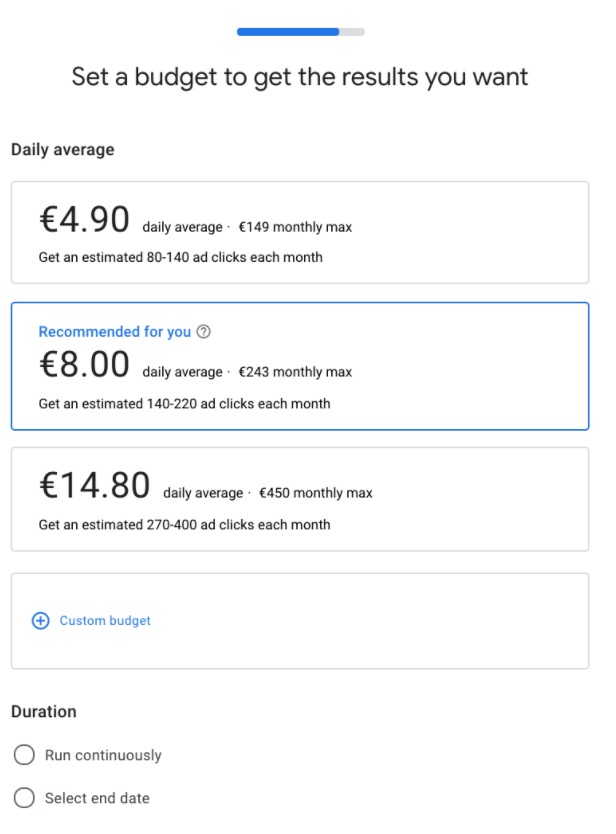
10. Finally, Google will give you a summary of your ad. If nothing needs to be changed, click the “Next” button

What is a “local campaign”?
A Google campaign will build a set of ads to be on multiple platforms. In other words, when you create a campaign for a store, the campaign will set up several ads that will be placed on Google Search, Google Maps, YouTube, the Display Network...
The campaign ads will appear on different platforms and in different formats based on users' interests and geographic data. Campaigns are therefore more targeted and personalized.

When creating a Google campaign, there is the possibility to select a specific goal based on your objective. By selecting the “Promotions and store visits” goal, you can build what is called a “local campaign”. This type of campaign will allow you to build a set of local ads or “local ads”.

Local campaigns are therefore also created with the intention of bringing customers to the store (just like local ads). But the advantage of local campaigns is that we will be able to count its store visits. Indeed, in addition to the classic reporting that we have with local ads, local campaigns will be able to calculate store visits thanks to GPS data and other elements (clicks, itinerary requests, ..)
How to create a local ad on Google?
Creating a local campaign is done through Google Ads. Before you can build one, you first need to create a Google Ads account and then link your Google My Business page with this account.
Here are the steps to follow:
- In the main Google Ads interface, click the "+ New Campaign" button
- Choose your campaign objective. For a retail chain, the objective “Promotions and in-store visits” is perfectly suited to their needs. Then, select the establishment(s) you want to find on your GMB listing. You can therefore select specific stores without having to include them all in your communication. This will allow you to separate stores for your advertising based on languages, regions, or other.


3. Select the name, language, budget, conversion, and start and end date of your campaign.


4. It's now time to configure your ads. Select the ad group of your choice. Attention! These must be configured before creating the campaign! We also advise you to prepare your resources in advance if not already done.
- Insert your website URL
- Give up to 5 different titles to describe your campaign. These titles must be short and impactful. You must make sure that the person is interested with this single and unique sentence.
- Provide up to 5 descriptions for your campaign
- Upload at least one photo
- Upload at least one video
We advise you to give Google as many resources as possible because the artificial intelligence will automatically optimize your campaign to achieve your objectives.


The major differences
In broad terms, the difference between “local ads” and “local campaigns” lies in:
- The way to appear on the Google network
- How to measure conversion
- How to calculate the price
- How to build advertisements

We hope you're now a pro at local advertising. To learn more, discover our other articles on the subject:
Save time and gain visibility from today
Schedule a personalized demo and see how the platform optimizes every local action in your network.


Latest articles
Discover other selected articles to further explore the topic. To continue exploring the levers that really make a difference for your points of sale.