Tutorial: How to create an Instagram Business page
Instagram Business is an essential platform for creating your brand image and highlighting the local points of sale of your franchise! Through this article, discover why use an Instagram Business page for your points of sale and how to create one, from mobile or computer.
- What are the differences between Instagram Business and Creator accounts?
- Profile Categories
- Contact Details
- Call-to-action Buttons
- Content Planning
- Instagram Shopping
- Advertisements
- Performance Analysis
- How to create an Instagram Business page?
No need to introduce it, Instagram is now known worldwide! According to Kepios, Instagram has an audience of 500 million daily users, 81% of whom use it to search for products and services. Instagram is therefore an essential tool for your business! Indeed, this social network allows you to expand your community, showcase your products and services, boost your sales and create the visual identity of your brand through quality content. To do this, Instagram provides you with 2 types of accounts: "Business" and "Creator".
What is the difference between Instagram Business and Creator accounts?
Here is a summary of the notable differences between the two accounts.
Instagram Business Profile Categories:
Instagram treats creator and business pages as two separate entities. Both accounts have their own unique profile.
In the case of brand and franchise networks, we recommend using Instagram Business, as this type of account best highlights local points of sale (Resellers, Local businesses, Brands, Organizations, Service providers), and it is not possible to sync the Creators' profile via Instagram's API.
Note that creator pages are intended for public figures, content creators, photographers, artists, influencers, …
Instagram Business Contact Information:
Business accounts have an additional option to add their location: their headquarters, storefront, restaurant location…
This option is very important for your local marketing, as it's thanks to this information that your customers will be able to get to your store more easily.
Instagram Business Call-to-Action Buttons:
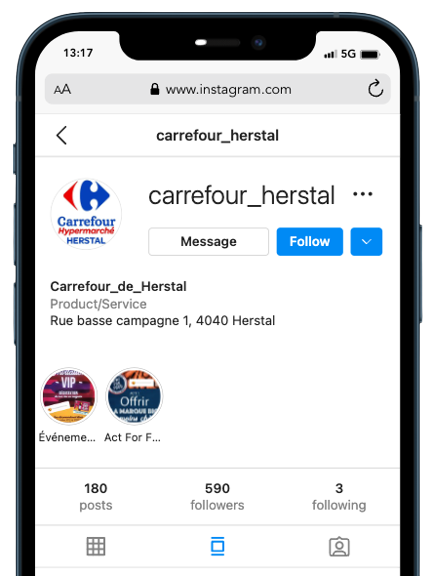
Call-to-action buttons are placed between your profile bio and story highlights.
Business accounts can choose to include different types of buttons for their followers, such as “Order,” “Email,” or “Book.”
Most of these features are optional and can be enabled or disabled in your account settings.
Creator accounts, on the other hand, have much less functionality.
Instagram Business Content Planning:
Third-party content scheduling available only for Business accounts. If you want to schedule your content in advance, you will need an Instagram Business account.
Instagram Shopping:
Creator and Business accounts both have shopping features, although they are slightly different:
Business accounts can also set up Instagram Shopping, which allows them to add a store to their profile, tag products in posts/stories, and display previews. While creator accounts, they have the ability to tag products from brands whose access is approved.
Advertisements:
You can create paid ads with both accounts.
Performance Analysis:
Both accounts offer detailed information and analysis on the page's public/audience and the performance of your content such as:
The demographics of your audience, the times of day when your audience is most active, profile visits, clicks on the website, impressions of your posts as well as their reach, etc.
In the case of franchise and chain networks, we recommend using the accounts Instagram Business, since it falls within the recommended category (Resellers, Local Businesses, Brands, Organizations, Service Providers), and it is not possible to sync the Creators' profile via Instagram's API.
Also note that creator pages are intended for public personalities, content creators, photographers, artists, influencers, …
How to create an Instagram Business page?
To get started, you will need an existing personal Instagram account.
Note also that if you are using a private profile on Instagram, you will need to switch it to public mode before you can switch your personal account to a Business account.
Create an Instagram Business page on a computer
Go to your profile and tap the menu icon at the top right.
Tap Settings.
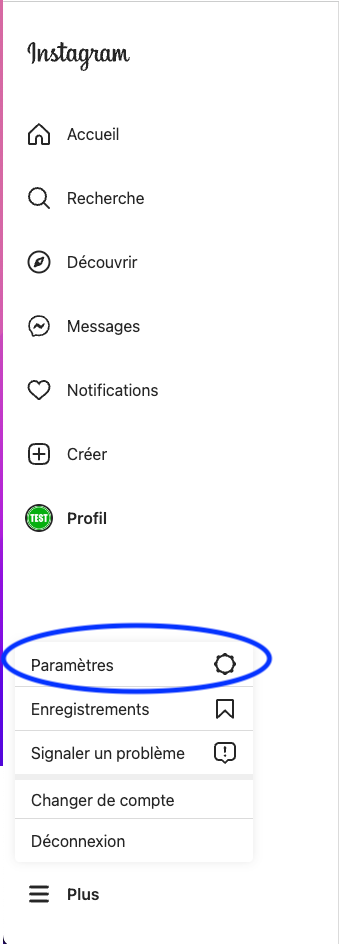
Tap on “Switch to a professional account”
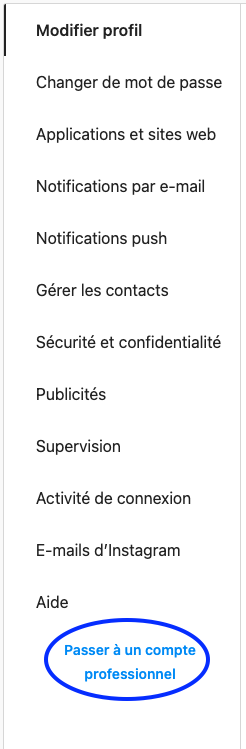
Select a category for your business and press Done.
Tap OK to confirm, then tap Business.
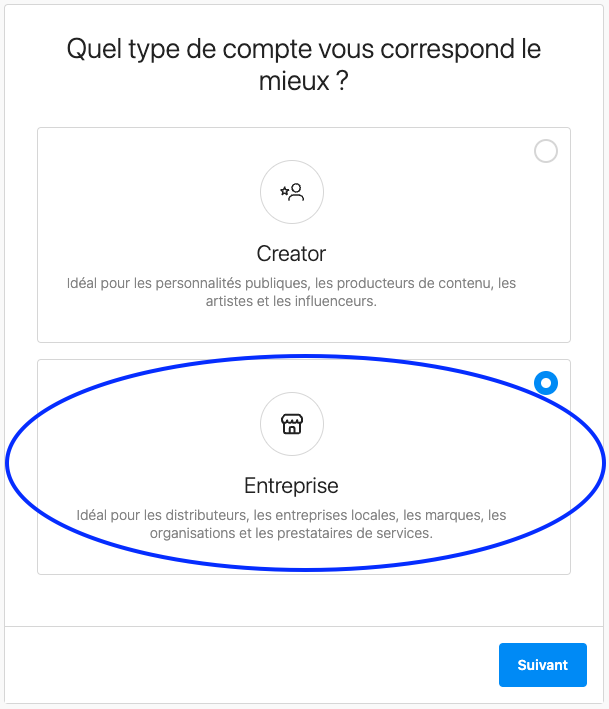
Tap Next.
Add your contact information such as your address, email address, phone number…
Save them by clicking Next. Or press “Don't use my contact information” to skip this step.
Create an Instagram Business page on Mobile:
Go to your profile and tap the menu icon at the top right.
Then tap Settings.
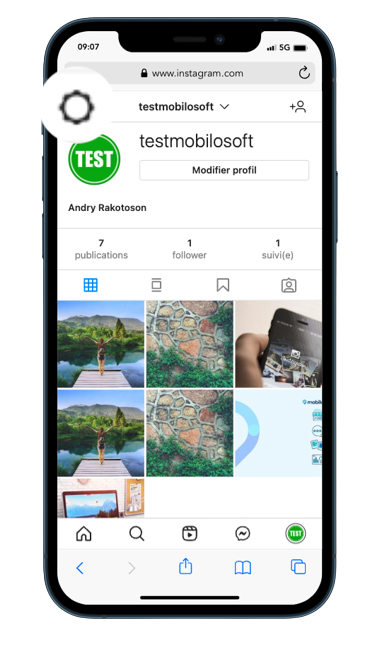
Tap on "Account" then on "Switch to a professional account".
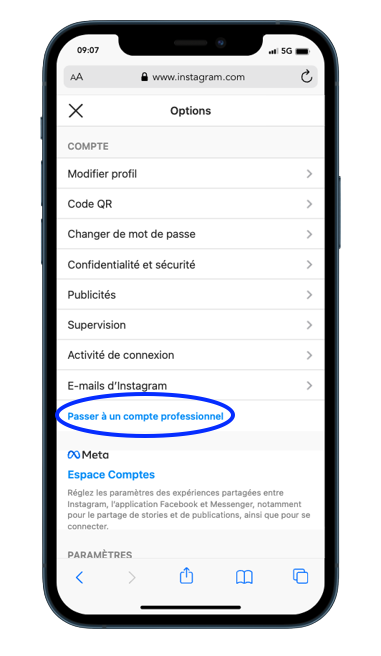
Finally, select your business category and add the contact details you want to appear on your professional profile or click "skip this step".
We recommend that you connect your professional account to a Facebook Page associated with your business. This will allow you to use all the features available for businesses more easily. Note that only one Facebook Page can be linked to your Instagram account.
👉 Don't hesitate to check the Instagram support page if you want to learn more about the features related to Business accounts.
And that's it! Your professional Instagram page is created, now you just have to take care of your future content.
If you want more information about Instagram, don't hesitate to consult our previous articles, below ⬇️
Save time and gain visibility from today
Schedule a personalized demo and see how the platform optimizes every local action in your network.


Latest articles
Discover other selected articles to further explore the topic. To continue exploring the levers that really make a difference for your points of sale.