The benefits of Google local campaigns
Thanks to their presence on all Google platforms, local campaigns enable brands to remain visible throughout the customer journey. They facilitate the acquisition of new prospects, strengthen local awareness, and stimulate visits to the point of sale. Used in a structured way, they become a direct lever of performance, as shown in the Färm case study and its "galette des rois" campaign.
Local Google campaigns are important for retail chains as they increase the digital visibility of physical points of sale through advertising on Google's ecosystem (Search, Maps, Display Network, YouTube, ...).
The implementation of local campaigns allows points of sale to adopt a "top of mind" strategy. In other words, it allows you to remind customers or prospects, within a given radius around the point of sale, of your presence and the services, products, or actions you offer.
In this article, you will discover:
- What is a local campaign
- What are local campaigns used for
- How they work
- How to implement them
- A Client Success Story on the subject
1. What is a Google local campaign?
A local campaign consists of digitally promoting your store in a geographic region around it. The campaign ensures that the most important information about your brand is automatically displayed on the digital platforms of your potential customers in the vicinity.
With the given information, Google will promote your establishment across all its platforms. Ads will appear on:
- Google Maps when a person searches for a business of your type or explores a nearby area on Google Maps.
- The search engine Google Search when a person uses terms relevant to your business
- Youtube in a video format when a person is viewing a video near your establishment
- All partner sites and applications Google Display when a person is on the web.
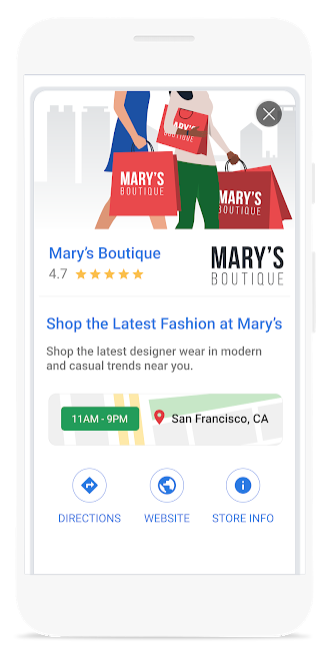
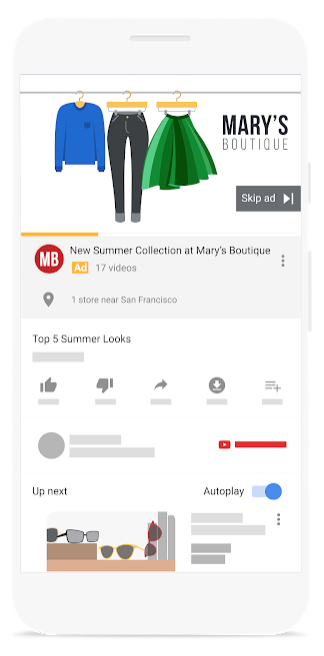
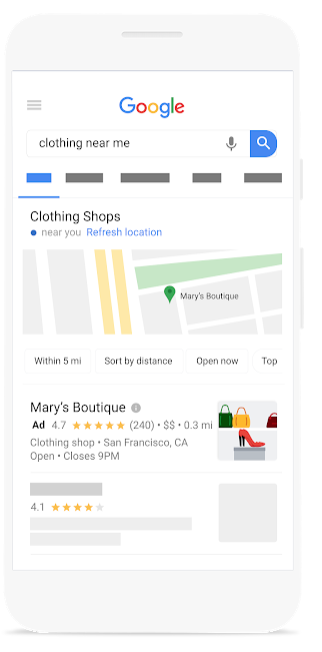
2. What are Google local campaigns used for?
A local campaign is very useful for reaching potential customers because it increases online visibility of the sales outlet(s). Reaching new customers is usually complicated. That's why it's wise to be on all Google platforms, which is the most important search engine (representing 95% of market share on mobile). This way, you'll be present at all stages of the “customer journey” (awareness, consideration, conversion, loyalty) of your prospects.
A local campaign therefore allows you to achieve business objectives by maximizing visits to your point of sale.
3. How do Google local campaigns work?
Google local campaigns are very simple to set up. When creating a campaign, just indicate that the campaign objective is "promotions and in-store visits". Then, just indicate a few details:
- The GMB listing of the point of sale (which will provide all the information such as address, opening hours and phone number)
- The budget for your campaign
- The text for your campaign
- Images for your campaign
- The videos for your campaign (if needed)
Thanks to its “machine learning” system, or automatic learning, Google will optimize bids, ad placements and ad combinations for your needs.
4. How to implement a Google local campaign?
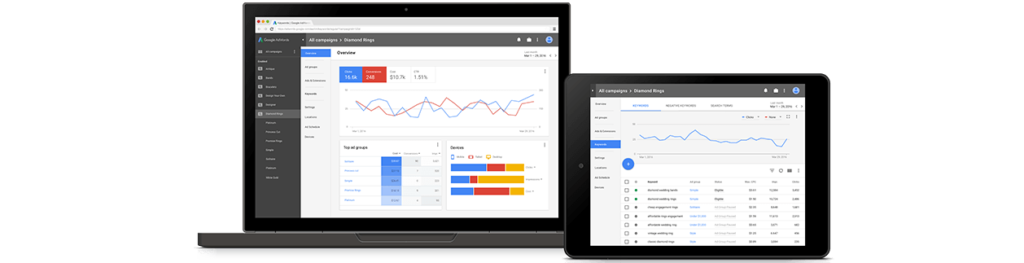
The implementation of a local campaign is done via the Google Ad interface. It is quite simple to set one up for a single point of sale, but when it comes to organizing local campaigns across a network, you can use the MyMobilosoft campaign hub. Here is a list of resources that we recommend preparing before building your campaign on Google Ad:
- A budget strategy to identify the daily budget you want for this campaign.
- A list of 5 different titles for this. These titles should be attention-grabbing. One title is enough for your campaign, but it's recommended to provide several as Google will analyze which one brings the most results. 30-character limit.
- A list of 5 different descriptions of your store. These descriptions must contain a maximum of 60 characters. We advise you to propose a description with a promotion. Once again, Google will analyze the one that brings the most results. Limit of 60 characters.
- A list of 5 CTAs or “Call to Action” that are short formulas that encourage people to visit the store (e.g. “Visit Now”, “Visit Today”, “Visit us safely”,...). 11 character limit.
- The logo of your brand. 1:1 ratio format with a minimum size of 116px x 116px. Maximum file size of 5Mb.
- A set of images for the campaign. It is recommended to have around 20 photos for a single campaign. Format ratio 1:1 (with minimum size of 314px x 314px) or ratio 1.91:1 (with minimum size of 600px x 314px). Maximum file size of 5Mb.
- A set of videos under 20 seconds. Preparing videos can be time-consuming, but having at least one is always beneficial for your campaign.
To learn more, a Google article has been written on the subject.
5. A case study was conducted to examine the benefits of Google local campaigns
In the context of a collaboration with Färm, a network of cooperative organic stores, Mobilosoft proposed the construction of local advertising campaigns. This is with the aim of improving the digital visibility of all its network sales points. Thanks to a first local campaign dedicated to promoting the "galettes des rois" action, the Färm network achieved its objectives. Discover how this Google campaign helped our client!
[th-button text="Discover our client success story" href="https://mobilosoft.com/campagnes-locales-comment-les-magasins-farm-ont-augmente-leur-action-galette-des-rois/"]
Save time and gain visibility from today
Schedule a personalized demo and see how the platform optimizes every local action in your network.


Latest articles
Discover other selected articles to further explore the topic. To continue exploring the levers that really make a difference for your points of sale.
%20(1).webp)