How to implement Facebook Places pages for my network of points of sale?
Facebook Places offers chain networks a structured framework to reference their stores at the local level and centralize their management. Thanks to the connection between a main page and local pages, each point of sale can display its specific information, reviews, and content while benefiting from the brand's visibility.
You own a network of physical establishments, you are present on Facebook or plan to be? If you want to communicate locally, a simple fan page will not be enough. Discover here how to reference your local pages via the Locations. C’est aujourd’hui le moyen le plus adapté, proposé par Facebook, pour connecter les enseignes de retail à leur audience locale sur son moteur de recherche.
Before going further: The possibilities to start with Facebook as a brand
Retail brands have several options to manage their visibility on Facebook:
1. Have only a Main Page
2. Have only Location Pages
3. Have a Main Page of’ a side and Location Pages on the other
4. Have a Main Page linked to Location Pages. It’s the most advantageous option and that we will study.
[th-button text="Download the e-book" href="/wp-content/uploads/2021/03/EN-Guide-to-local-listing.pdf"]
Add and edit Facebook Places pages for your brand from your main page
1. If you have not yet accessed à the Locations, you can request it via this form. You will be asked to provide your name, an email address, the number of establishments in your network and the main page à which you want to link your local pages.
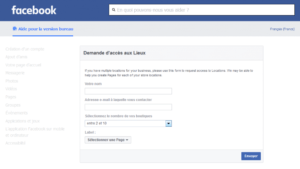
2. Go to your brand's main Facebook page.
3. Access the page settings at the top right.
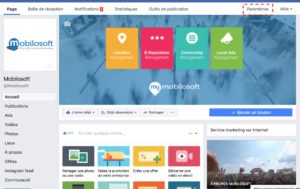
4. Click on Locations at the bottom à left.

5. Click on Add Locations (tab Locations)

6. To add a point of sale at a time, click Manually Add Locations. You can then provide the establishment information via a form.

To import multiple points of sale from a spreadsheet, click Upload Locations.

Note:
If it's the first time you've imported points of sale and if your main page indicates a postal address, you will be invited to delete this address from your page. For retail brands, the main Facebook page must be the 'parent' page of the Places pages (the 'child' pages).
Local pages can be partially renamed. By default, they carry the main page name followed by a location description: [City] or [Address] + [City] if multiple points of sale are in the same city.
7. You can modify your brand's establishments by clicking on the pencil icon.
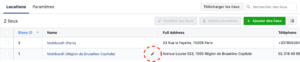
8. Define the visibility options for your content and your points of sale on Facebook via the Settings.

Local Content allows you to enable or disable the automatic duplication of posts from the main Facebook page to location pages.
Locations Tab allows you to enable or disable visitors of your local pages to see the other establishments of your brand nearby. If you check Do not allow, the map and the Locations menu will not appear (see next point).
9. Users can now access Places on your main page menu and find your establishments on a map!

Additionally, here is a tutorial that explains how to claim your establishment's Facebook page.
Facebook local pages: What are the benefits? What are the implications for headquarters and on the ground?
There are benefits to be gained from Location pages both for consumers and for retail brands. On one side these local pages allow users to access practical information, view customer reviews and communicate directly with the point of sale (Facebook Messenger, Click to Call…). On the other hand, they provide your business with better local visibility and allow developing proximity between local teams and customers by sharing specific content on the establishment pages.
Despite everything, the implementation of Facebook Places pages requires human and financial resources proportional to the size of your network of sales points. You must take into account training issues, integration (community managers must collaborate with local establishments), accountability, etc.
[th-button text="Download the e-book" href="/wp-content/uploads/2021/03/EN-Guide-to-local-listing.pdf"]
Check out other articles on the subject...
Save time and gain visibility from today
Schedule a personalized demo and see how the platform optimizes every local action in your network.


Latest articles
Discover other selected articles to further explore the topic. To continue exploring the levers that really make a difference for your points of sale.